
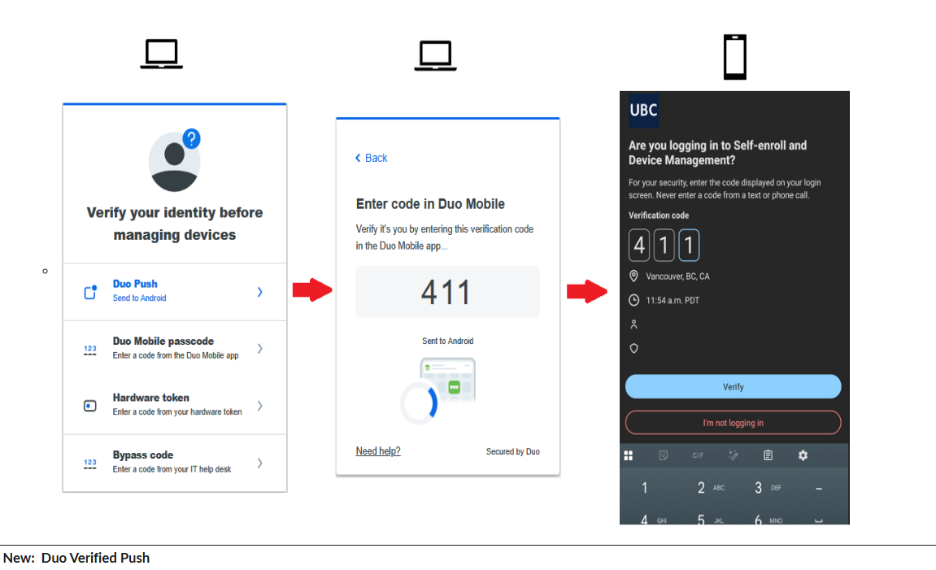
Duo Mobile Push notifications are the most commonly used multi-factor authentication (MFA) method at UBC. To strengthen account security, all Duo Mobile Push notifications, with the exception of UBC VPN authentication, will transition to Duo Verified Push notifications on November 10, 2026. This will introduce number matching as the primary verification step.
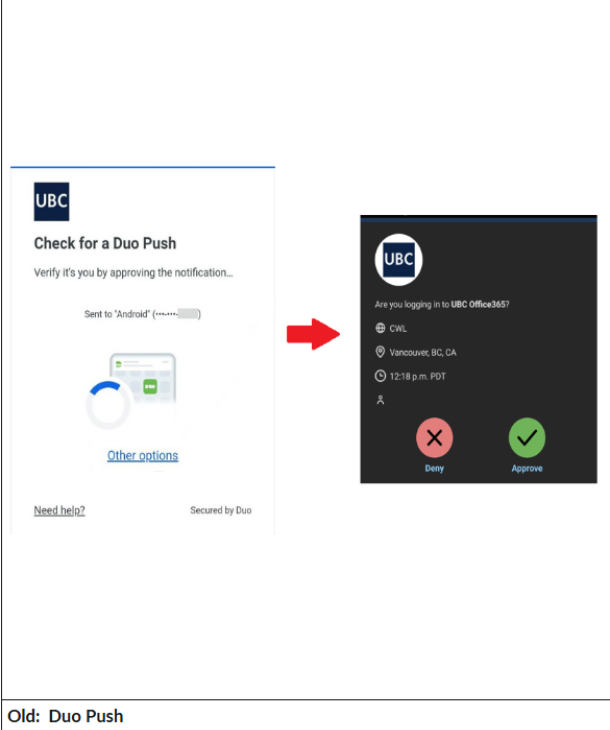
This means that after logging in with your UBC CWL to access UBC services, users will be required to enter a 3-digit verification code, displayed on the application or service they are accessing, into the DUO Mobile App. This will replace the current single-tap approval process.
Exceptions: Duo Mobile Push notifications, without number matching, will continue to be used when authenticating to the UBC VPN.
Duo Push Notification (OLD):
Duo Verified Push Notification (NEW):
Why is this change happening?
This security upgrade helps keep user data and information safe by preventing threat actors from taking advantage of push harassment, push fatigue, and accidental approval of fraudulent pushes to gain access to UBC services and phish victims.
- Push Harassment – Multiple successive push notifications to bother a user into accepting a push for a fraudulent login attempt
- Push Fatigue – Constant MFA means users pay less attention to the details of their login, causing a user to mindlessly accept a push login
Who is affected?
This update will be automatically applied to all users, including UBC students, faculty, and staff, who currently use the DUO Mobile App to authenticate UBC services. No action is required from users for this change to take place.
Can I try Duo Verified Push before it is rolled out?
Yes. Anyone who would like to see Duo Verified Push in action before the November rollout can log in to the MFA Enrollment and Device Management website at https://mfadevices.id.ubc.ca and select "Manage your MFA devices". This action will trigger a Duo Verified Push request, allowing you to experience the new authentication process.
FAQ
Need support?
- For general information and support, visit the Multi-Factor Authentication Service Page and Multi-Factor Authentication IT Knowledge Base articles
- For questions, please contact us at privacy.matters@ubc.ca


